> For the complete documentation index, see [llms.txt](https://docs.developer.singpass.gov.sg/docs/llms.txt). Markdown versions of documentation pages are available by appending `.md` to page URLs; this page is available as [Markdown](https://docs.developer.singpass.gov.sg/docs/introduction/understanding-the-basics-of-oidc.md).
# Understanding the basics of OIDC
[OpenID Connect 1.0](https://openid.net/specs/openid-connect-core-1_0.html) (OIDC) is a simple identity layer on top of the OAuth 2.0 protocol. It:
* Allows clients to verify the identity of the end user based on the authentication performed by an Authorization Server
* Allows clients to obtain basic profile information about the end user in an interoperable and REST-like manner
* Allows clients of all types, including Web-based, mobile, and JavaScript clients, to request and receive information about authenticated sessions and end-users
## OIDC Actors
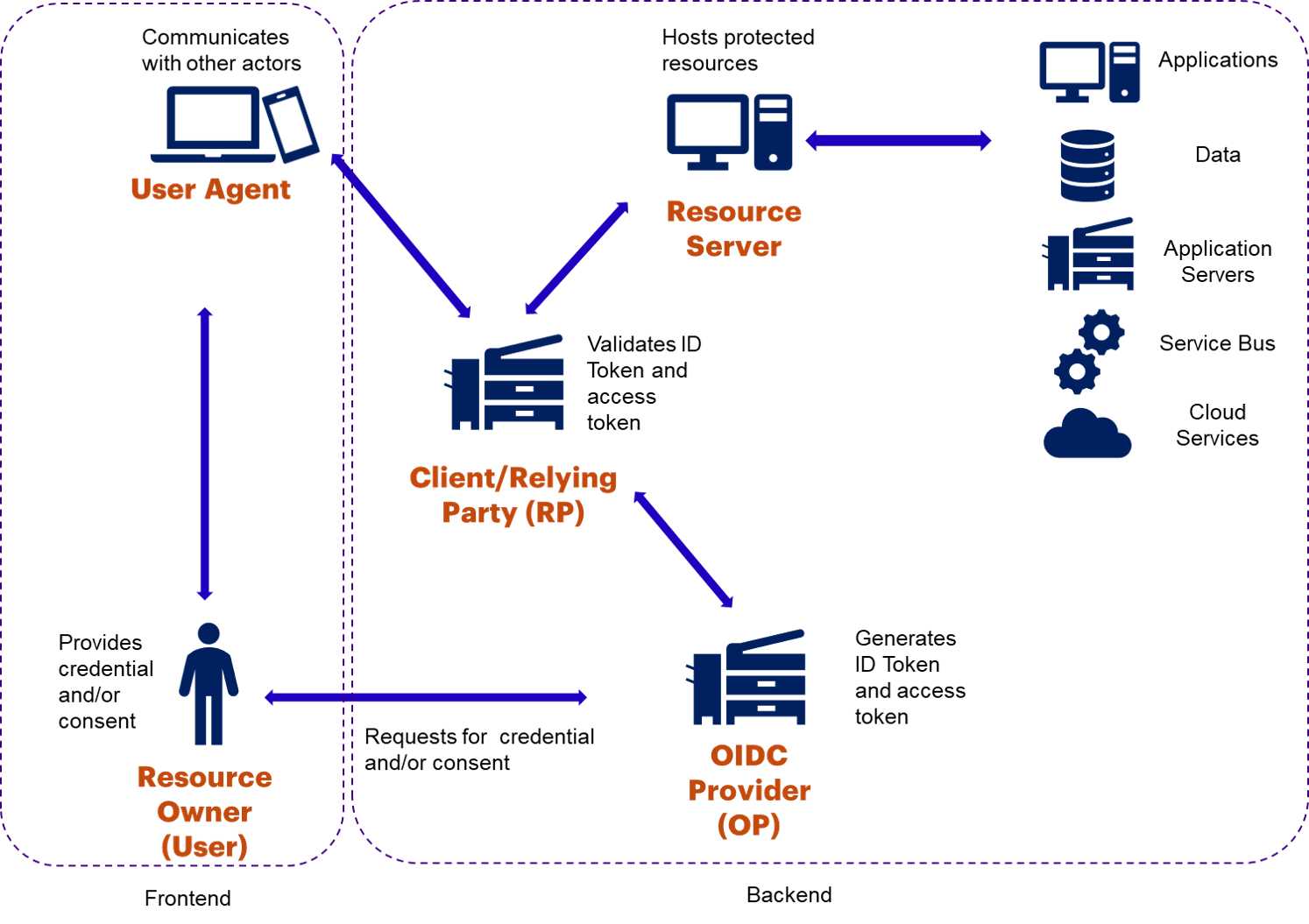
There are several actors involved in the Open ID Connect protocol. The following sections will detail each actor involved in the communication.
OIDC Actors Flowchart
OIDC Provider (OP)
Singpass is an OpenID provider and it is the “vouch for” party in an identity federation. That is, it gives assurances of the identity of the user to the other party. The OpenID provider is responsible for:
* Managing users and their identities
* Issuing tokens
* Handling user administration
* Authenticating the user
* Vouching for the user's identity with the relying party
* Revoking user’s authenticated sessions and tokens
Client or Relying Party (RP)
The business entity will implement the relying party (also client or consumer) which will be the “validating party” in a transaction. The relying party or client is responsible for:
* Controlling access to services
* Validating the various tokens issued by OpenID Provider
* Validating the asserted identity information from the OpenID provider (typically by way of verifying a digital signature)
* Providing access based on asserted identity
* Managing only locally relevant user attributes, not an entire user profile
* Each client must be registered with an OpenID provider.
The clients registered with Singpass OP must be confidential clients, which means every client must be registered with Singpass OP with their `Client ID` and `JWT Assertion`.
User Agent
The user agent is a web browser or mobile browser or mobile application via which the user (resource owner) will initiate the communication with the OpenID Provider and Relying Party:
* Serves static or dynamic pages
* Handles redirections
* May store cookies, user, and session information
* Should not be used to store confidential data like user identity or tokens
Resource Owner
The resource owner could be an end-user or an entity capable of granting access to protected resources. In most cases, it would be the user accessing agency applications.
Resource Server
The resource server will be hosted on the agencies' perimeter. It is the server that is hosting the applications protected by the relying party. Agencies' relying party will communicate with Singpass OP before granting access to protected resources hosted on the resource server.
Here are some additional resources for learning more about OAuth 2.0 and OIDC:
{% embed url="" %}
---
# Agent Instructions
This documentation is published with GitBook. GitBook is the documentation platform designed so that both humans and AI agents can read, navigate, and reason over technical content effectively. Learn more at gitbook.com.
## Querying This Documentation
If you need additional information that is not directly available in this page, you can query the documentation by asking a question.
Perform an HTTP GET request on the following URL with the `ask` and `goal` query parameters:
```
GET https://docs.developer.singpass.gov.sg/docs/introduction/understanding-the-basics-of-oidc.md?ask=&goal=
```
`ask` is the immediate question: it should be specific, self-contained, and written in natural language.
`goal` is what the user is ultimately trying to achieve, the reason they need the answer. Sharing it helps GitBook give you a better, more relevant answer. A goal is most helpful when it describes the outcome the user wants rather than restating the question. For example, with `ask=how do I create an API token`, a goal like `automate deployments from our CI pipeline` lets GitBook tailor the answer to that use case.
The response will contain a direct answer to the question and relevant excerpts and sources from the documentation.
Use this mechanism when the answer is not explicitly present in the current page, you need clarification or additional context, or you want to retrieve related documentation sections.